
Welcome to Wollongong City Council's online system to make applications and payments, or report an issue.
You can complete simple tasks as a guest user, or set up an account to save time and access a wider range of online services.
We're now using multi-factor authentication (MFA) to strengthen security when you log into your Online Services account.
Read our MFA page to learn more.
User types explained
Registered users
As a registered user, you can:
- Lodge and track applications and requests
- Link your property to your online profile
- Pay invoices or bills from Council and view transaction history
- Save draft applications
- Update your personal details
- Use all features available to guest users (see below).
To create a new user account, please use the Login or register button above, then click the link Don't have an account?
Guest users
Guest users can:
- Create requests and track with a tracking number
- Use Application Tracking to view DAs on exhibition and past development-related applications
- Search online maps
- See general land and property information
- Pay invoices or bills from Council.
Terms of use
By using our online services, you accept and agree to our terms of use. These will be shown each time you login.
You can also read our general terms of use which apply to all of Council's online services and websites.
Common questions about our online services
Setting up an account
You can register as an existing customer if you have a copy of your Council rates notice.
Follow the steps below:
- Click the button at the top of this page to Login or register
- On the login screen, click the link Don't have an account? This will take you to a registration screen.
- On the registration screen, tick the box Are you an existing customer with Council?
- Enter the Property ID shown on your rates notice (see the example below)
- Enter all your other details, then click Submit.
How to find your Property ID
Your assessment number is shown in the top right corner of your rates notice.
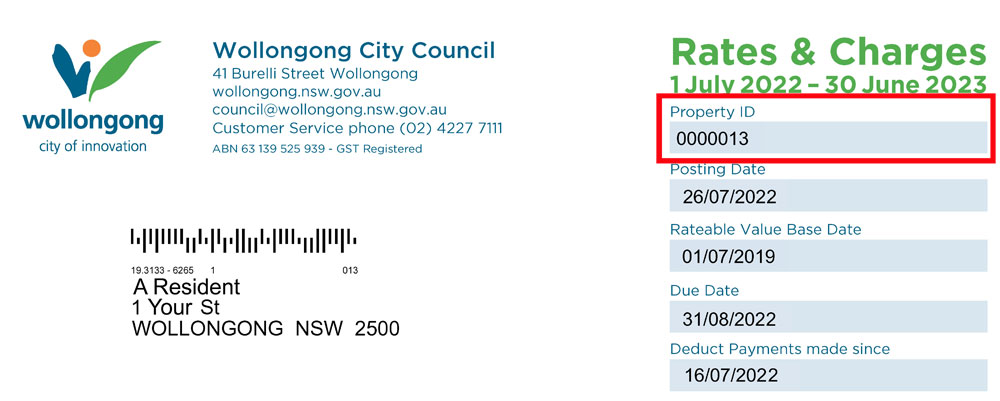
Don't have a rates notice?
If you don't have a rates notice, you can still set up a new account without entering a Property ID. Please note that the system will not automatically show your property information.
No. Anyone is welcome to create an online services account.
Yes, you can create a business account.
If you need both a business and a personal account, you can create these as separate accounts. Each account must use a different email address.
Click the 'forgotten password' link on the login screen, then enter your email address. If you have an account attached to that email address, you will be sent a link to reset your password.
If this doesn't work, please call us on (02) 4227 7111 for help.
Please note: to support your online security, you'll be prompted to reset your Online Services password after approximately 3 months.
Using online services
Tracking requests
Registered users: click the 'My Requests' button to see a list of your past and current applications.
Guest users: click the 'Track Request' button and enter a tracking number to check the progress of a request.
Tracking applications
Registered users: click the 'My Lodged Applications' button to see all of your past and current applications.
Guest users: use the 'Application Tracking' button and enter an application number.
Below is a quick guide to where you can find some common applications and information using our online portal.
| Item | Location in Online Services | Available to |
|---|---|---|
| Bush Fire Attack Level Certificates |
Apply for... Planning (including Pre-lodgement meeting) | Registered users only |
| DAs on exhibition Includes current applications on exhibition, related documents and the option to lodge a submission. Visit the Notifications and Submissions page to learn more about the submission process, and read our Protection of Privacy statement before you make a submission. |
How can we help? Development Applications on Exhibition | Everyone |
| Development Application Register Search by address or application number to view a current or past Development Application and determination documents (where a web-enabled version is available). See our document viewing guide for help. | How can we help? Application Tracking | Everyone |
| Development Consents Search by address or application number to view determination documents (where a web-enabled version is available). See our document viewing guide for help. | How can we help? Application Tracking | Everyone |
| Event applications |
Apply for.... Other Applications and Certificates Use of Public Land | Registered users only |
| Filming and photography applications | Apply for.... Other Applications and Certificates Use of Public Land | Registered users only |
| Land information Legal descriptions of land parcels. | Property and Land Public Land Search | Everyone |
| Maps View general map, or toggle layers to see planning and other information. | Property and Land View Council's Public Maps (or see our Maps page for links to different types of maps) | Everyone |
| Payments to Council Pay a rates notice, bill or invoice sent to you by Council. | Helpful Links Pay your Rates or Invoice | Everyone (have your invoice or payment reference number handy) |
| Payments - Rates and Invoices My Account | Registered users only | |
| Permit applications Includes Tree Permits, business activities work zones, and road, frontage or driveway works. |
Apply for... Permits or Licences | Registered users only |
| Property certificate applications Includes 10.7 Certificates, Building Information Certificates, Flood Level Information, Rates or Payments Owed and more. |
Apply for... Certificates | Registered users only |
| Property information including Lot number, Council Ward and property type | Property and Land Public Property Search | Everyone |
| Rates notice copy |
Apply for... Council Services | Registered users only |
| Resize your red bin | Apply for... Council Services | Registered users only |
| Report an issue or request a service |
How can we help? Report an Issue or Request a Service | Everyone |
| Track a request or report |
How can we help? Track an issue or request |
Everyone (using a tracking number) |
| Recent Activity |
Registered users only (no tracking number needed) | |
| Track an application Search by address or application number to view the status of an application and determination documents (where a web-enabled version is available). See our document viewing guide for help. | How can we help? Application Tracking | Everyone (using a tracking number) |
| Recent Activity | Registered users only (no tracking number needed) | |
| Update my contact information Change your name, address, email and phone. |
My Details Update My Contact Details | Registered users only |
|
How can we help? Report an Issue or Request a Service | Everyone | |
| Update my business details Or add a new business to your existing account. | My Details | Registered users only |
For most applications that involve payment, you will need to pay using a credit card to complete the application.
For some applications, Council will send you an invoice to pay at a later date.
Where other payment methods are available, this will be noted during the application process, or on the invoice we send to you.
When using our online portal, there is an 'Enterprise search' field at the top of the page.
This field lets you search for functions that are available in the portal.
Please note, you can't search for detailed information, such as a property address to view past Development Applications for that property, using this field.
To support your online security, your Online Services password will automatically expire after approximately 3 months. Don't worry, this does not mean your account has expired, or that any of your saved information has been removed from your account.
If your password has expired, you'll be prompted to create a new one the next time you log in.